
Poly Track Racing Arcade
Reviews
Poly Track Racing Arcade delivers an engaging arcade racing experience with its smooth 3D graphics and responsive controls. The built-in level editor adds tremendous replay value, letting you design custom tracks with ramps and loops. The time-based challenges encourage repeated play to improve your skills. While the car customization is limited to color changes, the core gameplay is solid and family-friendly. It is an excellent choice for players who enjoy skill-based driving games without complex mechanics.
About this game
Game Introduction
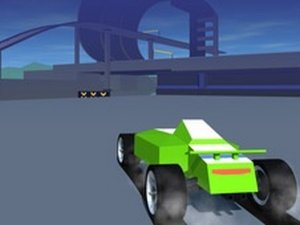
Poly Track Racing Arcade is a 3D driving game that focuses on speed and precision. Players control a minimalistic car through pre-built tracks that include quick turns, ramps, and loops. The main goal is to reach the end of each course as quickly as possible, testing your reflexes and coordination. What makes this game stand out is its built-in level editor, which allows you to design your own tracks and customize your car's colors. This feature provides endless replayability in a family-friendly environment. The game is designed to be easy to pick up but challenging to master, making it suitable for players of all ages.
How to Play
Players typically control their car using keyboard keys such as WASD or arrow keys to drive forward, steer, and navigate through the course. If you crash and cannot get back on the road, you can reset your position to continue racing. The goal is to focus on completing each track as fast as possible while avoiding crashes and going off track, as these waste precious time. The game includes ramps and loops that let you perform jumps and stunts, but you must stay sharp on quick turns to maintain speed.
Game Features
This racing game includes a built-in level editor for creating new tracks, customizable car colors, and time-based challenges to beat your personal best. It features ramps and loops for stunts and simple controls using keyboard keys. As an arcade-style game, it emphasizes quick, skill-based gameplay that is easy to pick up but challenging to master.
Tips for Success
To improve your performance, practice regularly to learn the layout of each track and master the controls. Focus on maintaining speed through turns by braking or accelerating at the right moments. Avoid unnecessary crashes by staying on the road, and use the reset feature quickly if you get stuck. Experiment with the level editor to understand track design, which can help you anticipate obstacles in pre-made courses.








Comments
0 comments