
Medieval Heroes Adventure Quest
Reviews
Medieval Heroes Adventure Quest offers a delightful, stress-free platforming experience. The bright medieval world, dual hero choices, and hidden treasures keep each level fresh. It runs smoothly in any browser without downloads, making it accessible on any device. The lack of violence and in-app purchases makes it ideal for family play. A truly enjoyable adventure.
About this game
Game Introduction
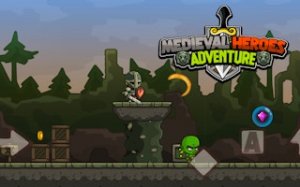
Medieval Heroes Adventure Quest invites players into a cheerful medieval world filled with wonder and light challenges. When mischievous magical creatures disrupt the kingdom, you step up as a hero to restore harmony. This HTML5 platformer runs instantly in any browser without downloads, making it easy to play on computers, tablets, or phones. Bright graphics, a pleasant soundtrack, and gentle gameplay create a cozy experience suitable for children and adults alike. Each level offers new paths, hidden treasures, and friendly creatures to guide, ensuring every session feels fresh and rewarding.
How to Play
Gameplay is simple and intuitive. Use on-screen direction buttons to move your hero left or right. Tap the jump button to leap over gaps and climb platforms. Tap the action button to release gentle magical bursts that guide creatures out of your way. Collect sparkling gems, gold coins, and health power-ups scattered throughout each level. Gather three or more gems in a level to earn a special star that tracks your progress. Work through all unique levels to complete your adventure and bring peace back to the kingdom. The clean interface keeps focus on exploration and fun.
Game Features
Features include dual hero choices for variety, multiple fun levels with increasing challenges, collectibles such as gems and coins, and achievement rewards that celebrate milestones. Each hero has a distinct look, adding personalization to the adventure. Levels are designed to be accessible yet engaging, with secrets to discover. Achievements encourage replay and mastery without pressure.
Tips for Success
Take time to explore each level thoroughly to find hidden treasures and extra gems. Practice your jumping and timing to navigate tricky platforms. Collect health power-ups whenever possible to stay safe. Replay earlier levels to improve your gem collection and earn more stars. Enjoy the journey and don't rush—each level is designed to be fun and rewarding at your own pace.








Comments
0 comments