
Table Tennis 2D Classic Arcade
Reviews
Table Tennis 2D Classic Arcade captures the essence of the original arcade hit. The minimalist design and straightforward controls make it easy to pick up, but mastering the angles and timing provides lasting challenge. The two-player local competition is a great way to enjoy quick matches with friends. It is a faithful tribute to a gaming milestone.
About this game
Game Introduction
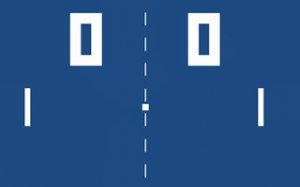
Table Tennis 2D Classic Arcade is a faithful recreation of the original table tennis arcade game that helped launch the video game industry. Developed by Allan Alcorn at Atari in 1972, this minimalist sports simulation became a cultural milestone. The core objective is simple: two players control paddles on opposite sides of the screen and attempt to deflect a small ball past the opponent's paddle. Each successful return keeps the rally alive, while a missed ball awards a point to the other player. The first to reach the target score wins. Its pure, two-player competition and direct test of hand-eye coordination make it a timeless challenge.
How to Play
To play, you need a partner for local two-player competition. Each player controls a paddle that moves vertically along one side of the screen. Player One typically uses keyboard keys to move their paddle up and down. Player Two uses different keys to move up and down. The ball moves across the screen at a steady pace. You must position your paddle to intercept it. The angle of your paddle affects the ball's trajectory, so quick reflexes and precise timing are essential. Anticipate where the ball will go and react accordingly. Each missed ball awards a point to the opponent. The match continues until one player reaches the predetermined score.
Game Features
This game offers historical significance as one of the first arcade video games. It features simple and intuitive gameplay that is easy to learn. Two-player local competition allows for head-to-head matches. The minimalist 2D aesthetics retain the original look of the classic arcade version. Cross-platform accessibility means it can be played through any web browser. The game is a direct test of skill without distractions, perfect for quick sessions with a friend.
Tips for Success
To improve your game, practice anticipating the ball's trajectory and positioning your paddle early. Stay centered when possible to react quickly to both high and low shots. Use small, precise paddle movements rather than large sweeps. Watch your opponent's paddle angle to predict the ball's direction. Finally, play regularly to sharpen your reflexes and timing.









Comments
0 comments